CamScanner- scanner, PDF maker (Premium Unlocked)
February 08, 2026
164 MB
v7.11.0.2601210000
Android 5.0
500,000,000+

Description
CamScanner: The World’s #1 Document Scanning & Management Tool
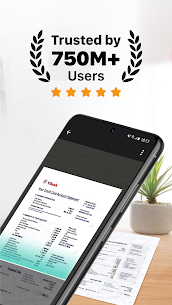
CamScanner is not just an app; it is a global productivity phenomenon used by over 500 million people daily. In a world that is increasingly digital, paper documents remain a stubborn necessity. Receipts, contracts, whiteboard notes, certificates, and business cards can easily become a disorganized nightmare. CamScanner bridges this gap, using advanced image processing technology to turn your smartphone camera into an intelligent scanner that rivals expensive hardware.
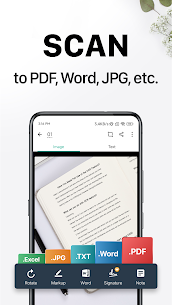
When you download the CamScanner APK, you aren’t just getting a camera app. You are installing a complete document management suite. It cleans up image noise, corrects perspective distortions, extracts text from images (OCR), and allows you to sign, edit, and share files in PDF, JPG, Word, or Excel formats. From students submitting homework online to CEOs signing million-dollar deals from a taxi, CamScanner is the essential utility for the modern Android user.
INTELLIGENT SCANNING & IMAGE PROCESSING
The core of CamScanner’s success lies in its proprietary image processing algorithms. It doesn’t just take a picture; it reconstructs the document digitally.
- Smart Auto-Cropping: The app instantly detects the edges of your document, even against a cluttered background. It automatically crops out the table or desk, leaving you with just the paper.
- Perspective Correction: Did you take the photo at an angle? No problem. CamScanner creates a flat, rectangular image as if you scanned it on a flatbed machine, correcting the perspective distortion instantly.
- Magic Color Filter: This legendary filter removes shadows, brightens the background to pure white, and sharpens the text. It makes even faint pencil notes look like professional, high-contrast digital documents.
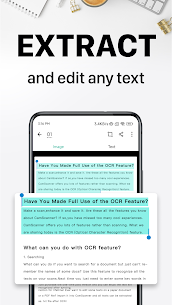
- Optical Character Recognition (OCR): Turn images into text! The built-in OCR engine recognizes text in over 40 languages. You can extract words from a scan to edit them in Word, copy them to your clipboard, or search for documents using keywords found inside the image.
- Batch Scan Mode: Need to scan a 50-page contract or a whole chapter of a book? Use Batch Mode to snap multiple photos in rapid succession. The app will process all of them in the background and compile them into a single PDF file.
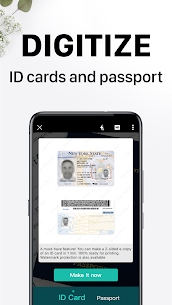
- ID Card & Passport Mode: Create professional scans of your identification documents. The app provides templates to scan both the front and back of a card and arranges them neatly on a single A4 page—perfect for bank applications or HR onboarding.
- Book Scanning: This advanced feature automatically flattens the curved surface of a book page and splits facing pages (left and right) into two separate document images. It even removes your finger from the shot if you were holding the page down!
- HD Quality: The app utilizes the full resolution of your phone’s camera, resulting in ultra-high-definition scans that are crisp enough for professional printing.
- Portability: Unlike a physical scanner, CamScanner is always with you. Scan receipts at dinner, business cards at a conference, or whiteboards immediately after a meeting ends.
ADVANCED EDITING, SECURITY & COLLABORATION
CamScanner goes beyond simple scanning by offering a suite of tools to manage, secure, and collaborate on your digital files.
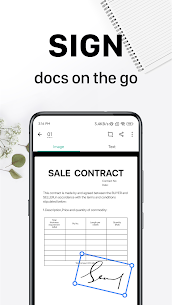
- E-Signature: Sign documents directly on your screen. You can save your signature and apply it to contracts or forms with a single tap, then email the signed document instantly. No need to print, sign, and scan again.
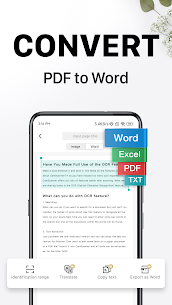
- File Conversion: Convert your scanned images or PDFs into editable formats. The app supports converting PDF to Word, Excel, and PPT, preserving the original layout, tables, and fonts as closely as possible.
- Cloud Sync & Cross-Platform: Sign in to your account to sync your documents across all your devices. Scan on your Android phone, edit on your iPad, and email from your Windows PC. Your documents are safe in the cloud and accessible anywhere.
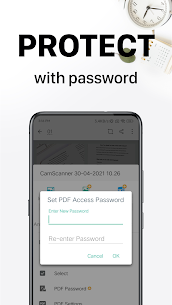
- Secure Important Docs: Privacy is paramount. You can set a passcode or fingerprint lock for viewing specific confidential documents within the app. Additionally, when sharing a secure link, you can set a password and an expiration date for the recipient.
- Wireless Printing & Faxing: Need a hard copy? Use AirPrint to print documents wirelessly to any nearby printer. Need to send a fax? You can fax documents directly from your phone to over 30 countries without needing a physical fax machine.
- Annotation & Watermarking: Mark up your documents with the doodle tool, add text notes, or highlight important sections. You can also add custom watermarks (e.g., “CONFIDENTIAL” or “DRAFT”) to your documents to protect your intellectual property.
- Collaboration: Invite friends, colleagues, or classmates to view and comment on your scans in a group. It allows for real-time feedback and streamlines group projects or business workflows.
- Tagging & Search: Organize your documents with custom tags (e.g., “Invoices,” “School,” “Personal”). The powerful search bar finds documents not just by title or tag, but by the text content inside the document itself (thanks to OCR).
- Greeting Card Maker: Use templates to create personalized greeting cards using your own photos and handwritten text, perfect for holidays and birthdays.
- QR Code & Barcode Scanner: A built-in utility that lets you scan QR codes to open URLs, add contacts, or check product prices via barcodes.
USE CASES FOR EVERYONE
- For Students: Scan blackboard notes, assignments, and library books. Digitize handwritten class notes to make them searchable.
- For Business: Scan receipts for expense reports, sign contracts remotely, and digitize business cards to save to your contacts.
- For Travelers: Scan passports, tickets, and itineraries to have offline backups in case of loss or theft.
- For Creatives: Digitize sketches, storyboards, and handwritten lyrics to archive and share with collaborators.
In conclusion, CamScanner is the definitive tool for the paperless era. It combines the quality of a hardware scanner with the processing power of a computer and the convenience of a mobile app. It saves time, reduces clutter, and ensures your critical information is always at your fingertips. Download the CamScanner APK today and experience the future of document management.
Android Requirements
To ensure fast image processing and smooth OCR functionality, your device should meet these specifications:
| Requirement | Minimum Spec | Recommended Spec |
| Android Version | Android 5.0 (Lollipop) | Android 10.0 or higher |
| RAM | 2 GB | 4 GB+ (For Batch Scanning) |
| Free Storage | 200 MB (App Only) | 1 GB+ (For Document Storage) |
| Internet | Offline Scan Supported | Wi-Fi / 4G (For Sync & Share) |
What's new
-
Scrollshot Feature: Capture long screenshots of web pages or documents and automatically stitch them into a single, seamless image.
-
Smart De-Duplication: New stitching algorithm efficiently merges photos vertically or horizontally while removing duplicate content.
-
Enhanced ID Scanning: Improved templates and recognition accuracy for scanning various types of ID cards and passports.
-
One-Tap Format Conversion: Upgraded Word and Excel conversion now preserves original layout formatting with higher precision.
-
Offline Desktop Editing: Strengthened workflow integration allowing for smoother offline editing that syncs once you are back online.
Images

Download links
How to install CamScanner- scanner, PDF maker (Premium Unlocked) APK?
1. Tap the downloaded CamScanner- scanner, PDF maker (Premium Unlocked) APK file.
2. Touch install.
3. Follow the steps on the screen.